Product

The whole compliance loop, not just the score.

PolicyLenz covers the work that surrounds an assessment: scoping the engagement, closing the gaps, recording the decisions, and proving all of it later. Organized here the way your week actually runs.
§ 01Assess & score

Numbers you can defend.

01

Assess against every control

Upload up to twenty documents per run and score them against one framework or all five at once, with automatic detection when you are not sure. Every framework returns a 0 to 100 score with a per-function and per-category breakdown.
02

Two honest numbers, always

The effective score counts everything: policy text, supporting evidence, and accepted dispositions. The policy-only score counts nothing but the document itself. Both are always visible, side by side.

03

Score against intent, not the whole catalog

Reusable scope profiles capture what an engagement actually covers, down to individual controls. Scoped runs use the engagement as the denominator, and out-of-scope controls disappear from the report instead of dragging the score down.

§ 02Close the gaps

From finding to fix, with a person in charge.

04

Remediate with a human gate

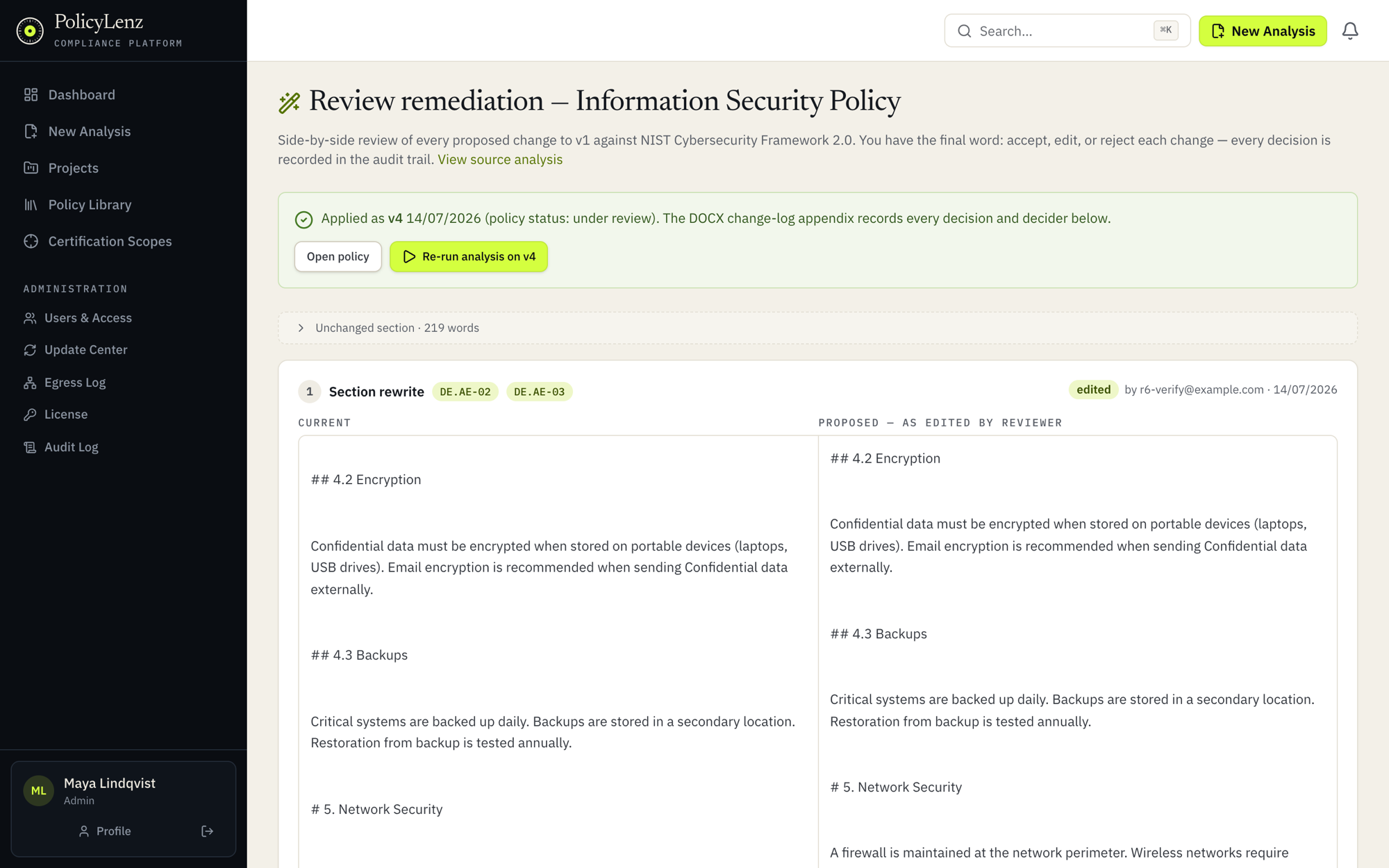
PolicyLenz drafts a change set targeting your specific gaps, never a new document version. You review each change in a word-level diff and accept, edit, or reject it. Apply stays locked until every change is decided.

05

Resolve gaps with evidence

Attach supporting documents, procedures, runbooks, or screenshots of controls in action, and PolicyLenz re-assesses the specific control against them. Coverage gained this way is labeled "via supporting doc" with full provenance.

06

Disposition what a document cannot fix

Some findings are risk-accepted, mitigated elsewhere, or simply not applicable. Four disposition kinds with mandatory written justification overlay the results, and not-applicable findings leave the denominator entirely.

policylenz.internal/remediation/review
PolicyLenz remediation review with side-by-side current and proposed policy text and per-change decisions
Fig. 4Remediation review: current and proposed text side by side, each change tied to the control it targets.

PolicyLenz proposes. You decide.

The review screen is where the engine hands control back to you. Word-level diffs show exactly what would change and which control it targets, and nothing reaches the document until a person with a name has decided every change.

§ 03Govern & prove

Built for teams, remembered forever.

07

Generate policies that pass their own audit

Draft a new policy with AI: scope the controls, approve an outline, and let the engine draft section by section. Every draft is validated by the same analyzer that grades everything else and revised until it clears the bar.

08

Organize by team and engagement

Projects give each client or business unit its own workspace with lead, member, and viewer roles, an activity feed, and per-policy assignees and statuses. The versioned policy library shows whole-document diffs between any two versions.

09

Report in the format the audience needs

PDF for the executive, DOCX for the working session, XLSX and CSV for the GRC tooling. Exports carry scope, coverage provenance, dispositions, and remediation decision logs.

§ 04By the numbers
Frameworks
5
Controls enumerated
358
Crosswalk mappings
408
Table data model
31
Automated tests
679
Architectures
2
Next step

Thirty minutes, your policy, live.

The fastest way to evaluate PolicyLenz is to watch it score a document you know well.